


Building a Dark Library To Re-Use your Calibration Frames

Don't waste clear skies taking calibration frames! If you've just bought a new astronomy camera, or even if you've had yours for a while but haven’t built a dark library yet, this is one of the easiest and smartest ways to save time down the road.
If you need help understanding how to take calibration frames (lights, darks, flats, flat darks), make sure to join the Galactic Course!
What are Dark Frames, and Why do they Matter?
Dark frames are important for subtracting unwanted noise from your images, especially hot pixels and thermal signal.
They’re taken with the same settings as your lights (exposure time, gain/ISO, temperature), but with the cap on, so no light reaches the sensor. By stacking these darks and creating a master dark, you can subtract this noise from your actual astrophotos and achieve a much cleaner result.
Darks are not as crucial with the newer camera sensors as they used to, but they’re still important in most cases.

How to Build a Dark Library
A dark library is a folder that stores your darks. You can then simply re-use the same darks (or the Master dark you need) whenever needed!
Step 1: Block out a daytime session
You don’t need a clear night to take darks. Set aside a few hours during the day, or during a cloudy night, cover your telescope (or your camera directly if it’s not attached to anything), and get ready to shoot dark frames!
You’ll want to shoot darks at several of your most commonly used exposure lengths. For example, 60s, 180s, 300s, 600s… and match the gain or ISO settings you typically use.
Step 2: Keep your temperature consistent
This is important: Make sure your sensor is at the same temperature you’ll use during real imaging. If you have a cooled camera, cool it down to your usual value (like -10°C or -20°C).
If it’s a DSLR, mirrorless, or other uncooled camera, try to do the darks either outside, in the garage, or other place where you feel the temperature is the same as your usual imaging spot.
Back in Vegas, we used to shoot our darks in…. the fridge. Yes, because the outside temperature was so hot, even at night, that our camera couldn’t cool down enough.
Step 3: Organize your darks
Create folders on your computer for each exposure/gain/temp combination. For example:
Darks > 180s > Gain100 > -10C
Try to capture at least 15-20 darks per set to get a good-quality master dark.
Step 4: Create master darks (optional)
You can stack these into master darks right away using your processing software (like PixInsight, DeepSkyStacker, AstroPixelProcessor, etc.), or keep the raw frames and stack them later. Either way, once you have them, they’ll be usable for months or even years (Up to a year is recommended, but I honestly use them for 2-3 years in a row and it’s just fine).
Why Having a Darks Library Saves You Time
Once you’ve built a dark library, you won’t need to waste time taking darks after every session. You’ll just import the master dark into the stacking script and reuse it over and over each time during preprocessing.
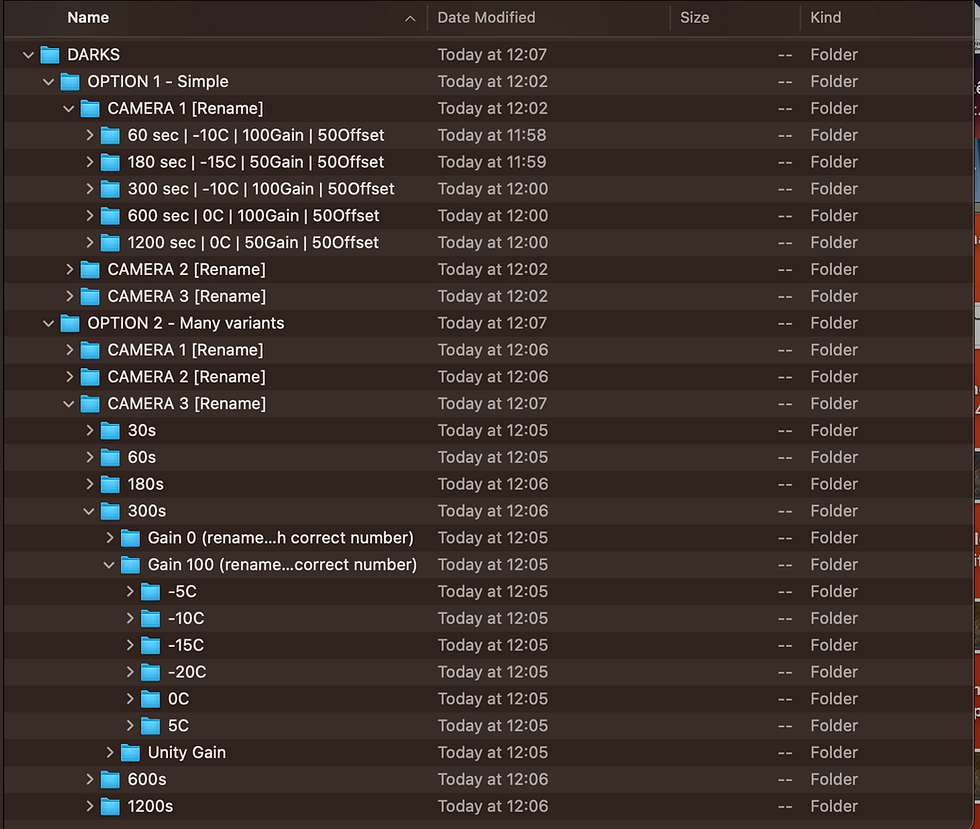
Psst: A zip file with pre-made folders is included in the Deep Space Course.
Would you like to learn astrophotography with our premium online course?

The Galactic Course includes thousands of lessons that cover all aspects of astrophotography. Step into an ever-growing realm of knowledge and learn at your own pace. Make life-long friends and connections with other members, and get tips from instructors that truly care about your journey and progress under the night sky.
Final Thoughts on Calibration Frames
Building a solid dark library is one of those behind-the-scenes steps that can make a huge difference in your final images. So be sure to spend a bit of your time doing this, and you'll thank yourself later!
Clear Skies,
Galactic Hunter


Comments